FMCG distributor billing software
Your counter and your salesmen,
on the same books.
Buy from the supplier, deliver to the shop, collect the money. Track every step in one place. It all keeps working when the internet does not.
- GST invoicing
- Batch & expiry
- Van delivery
- Field collections
- Works offline
For the owner
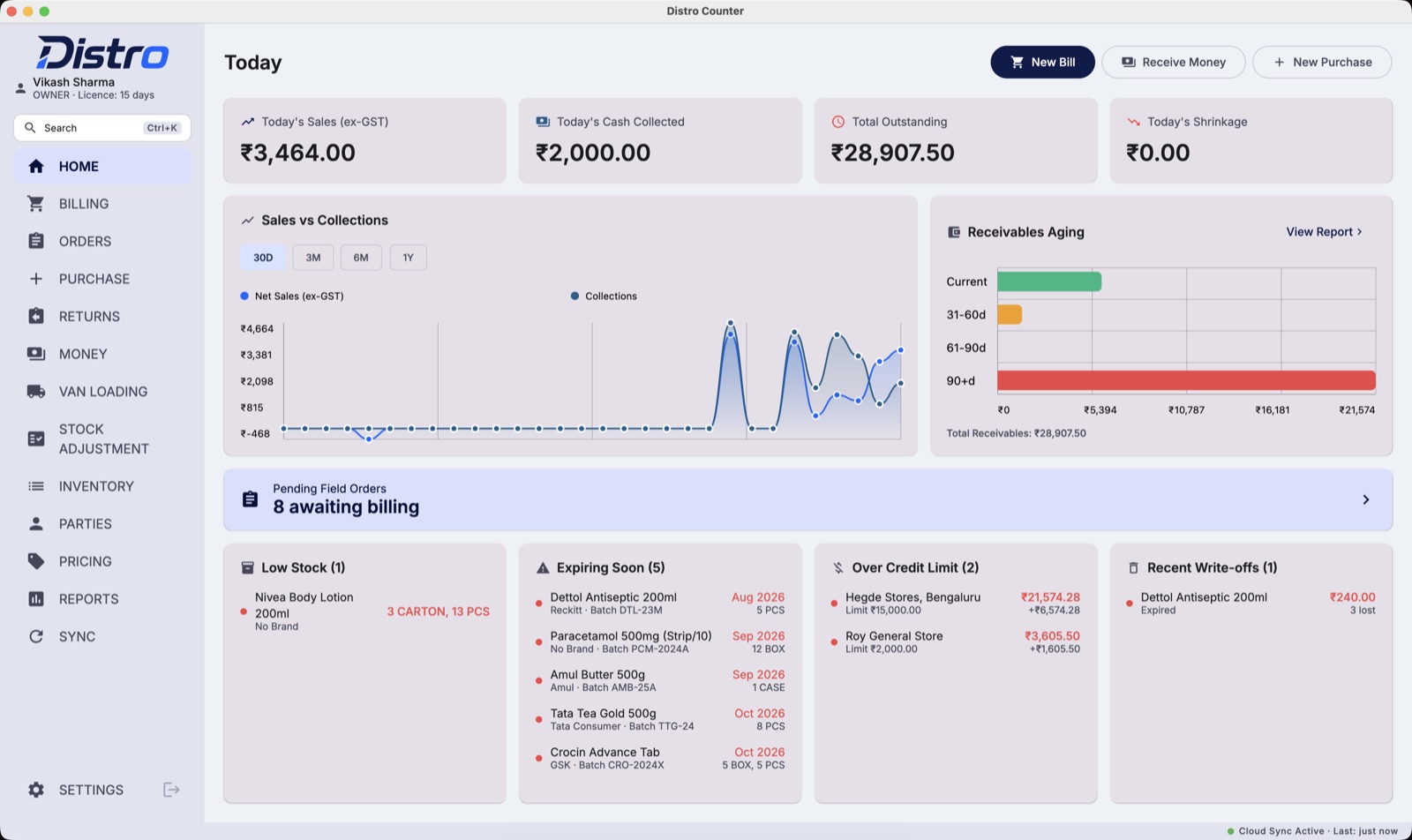
You open it and the day is already answered
The first screen is not a menu. It is the morning's three questions — no report to run.
What we sold, and the cash that came in
Today's sales and collections, and the trend behind them.
Who owes us, and for how long
Every rupee outstanding, split by how old it is.
What needs attention now
Field orders to bill, stock running low, batches about to expire.
Where the money goes
Three places a distribution house loses money quietly
None of them shows up as an error. Each one has a fix built in.
Ordered, never billed
Stock was short, so part of an order was left out. Nobody remembered it when the stock came in.
Stock that expires in the godown
The newer carton goes out first. The older batch runs out its date at the back.
The scheme nobody mentioned
The shop would have taken a bigger order for the bonus. Nobody told them it was there.
What it does
Everything the counter does in a day
GST billing
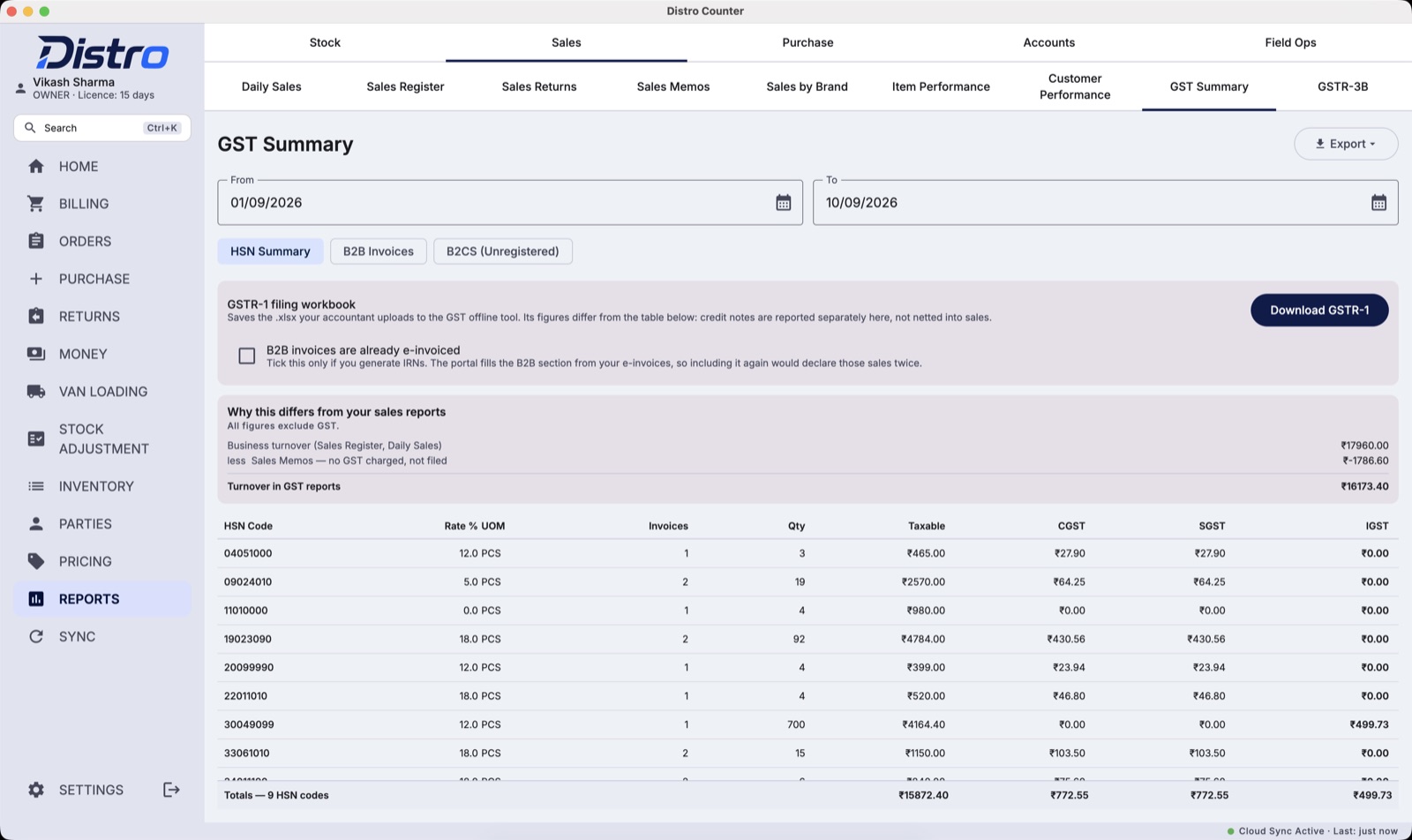
Tax invoices, credit and debit notes. GSTR-1 and 3B ready.
Batch & expiry
Sold first-expiry-first. Damaged returns kept off the shelf.
Field orders
Taken on the beat, billed at the counter. Never typed twice.
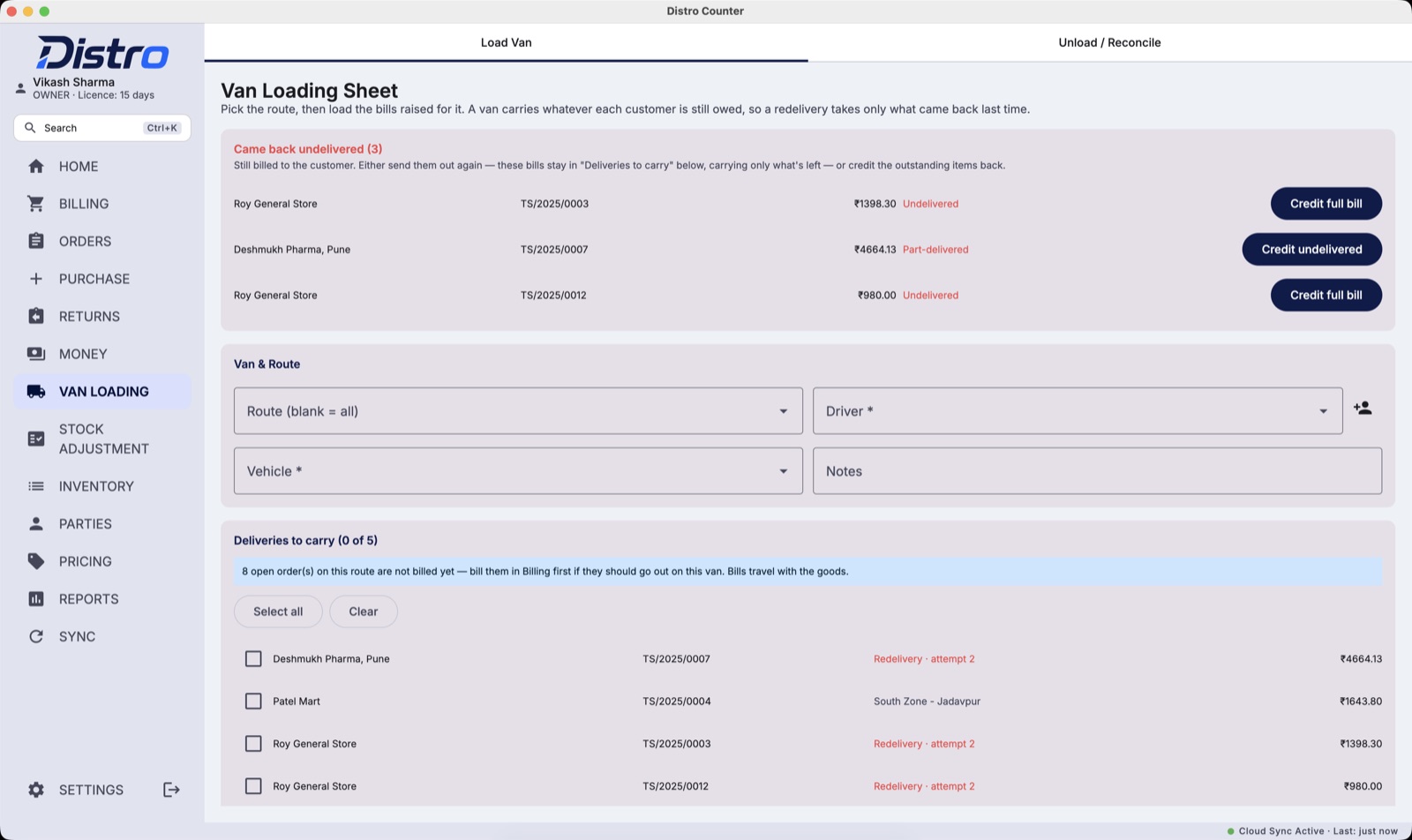
Van delivery
What each shop took. What came back becomes a credit note in one click.
Collections
Receipt with a photo of the payment. Matched when the cash is handed in.
Rates & schemes
The rate on the rep's phone is the rate on the bill.
Beat plan
Which rep covers which shops, on which day.
24 reports
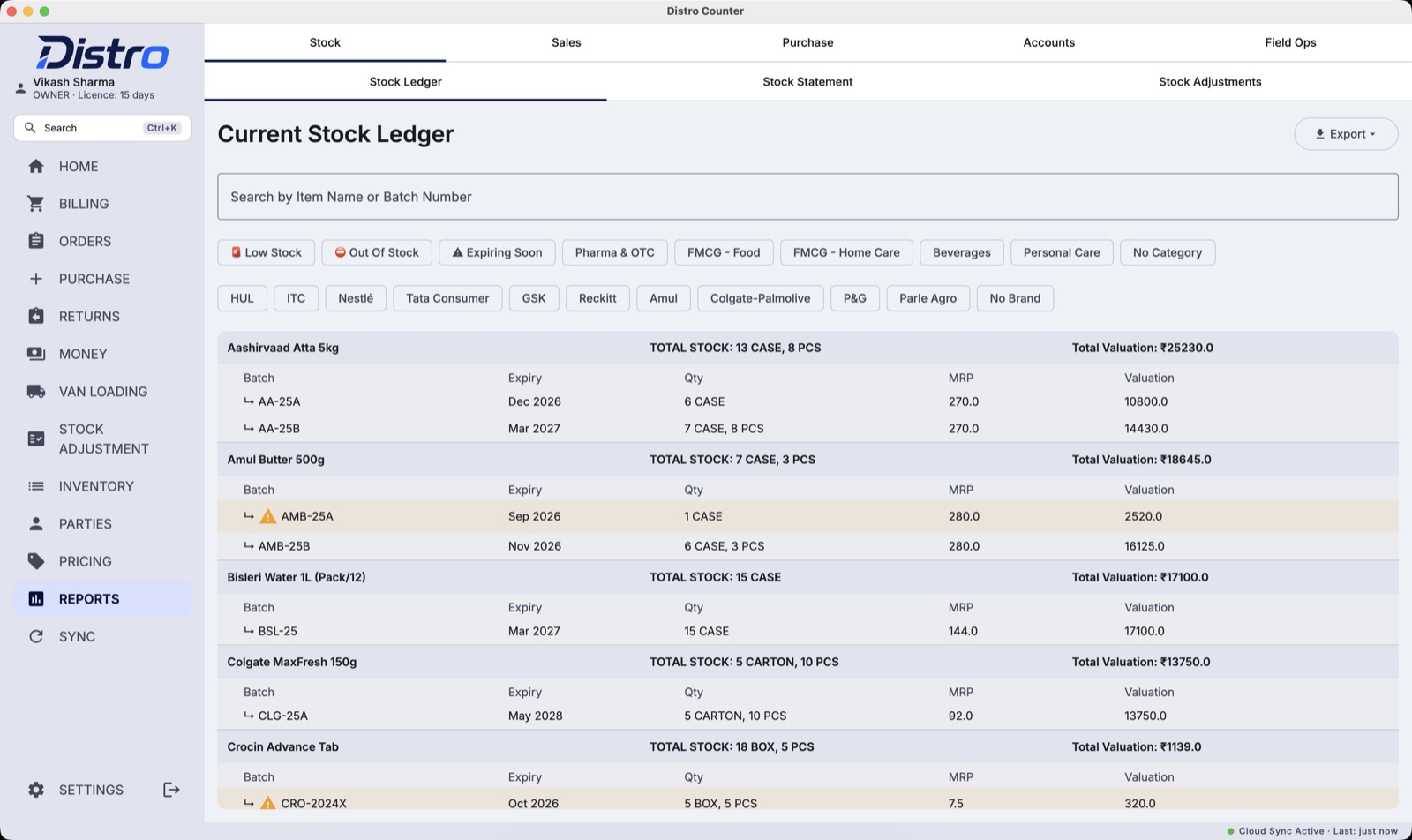
Stock, sales, dues, field work. Every one out to Excel.
How it works
Built for a connection that comes and goes
Every device keeps a full copy of your books. Nobody presses Sync.
- The rep takes the orderSignal or no signal.
- It syncs by itselfThe counter checks every minute.
- The counter bills itNew rates reach every phone the same way.
In the field
The same books, in the rep's pocket
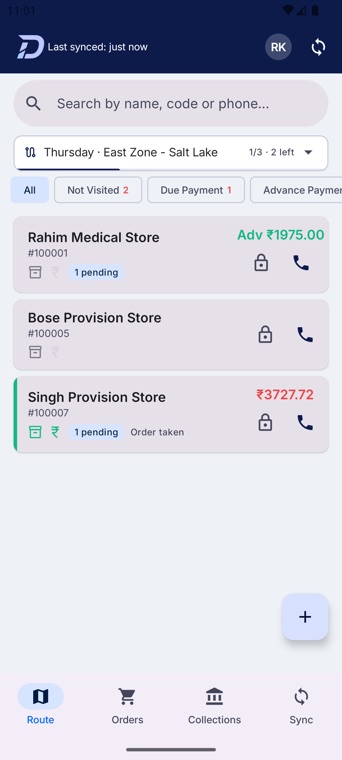
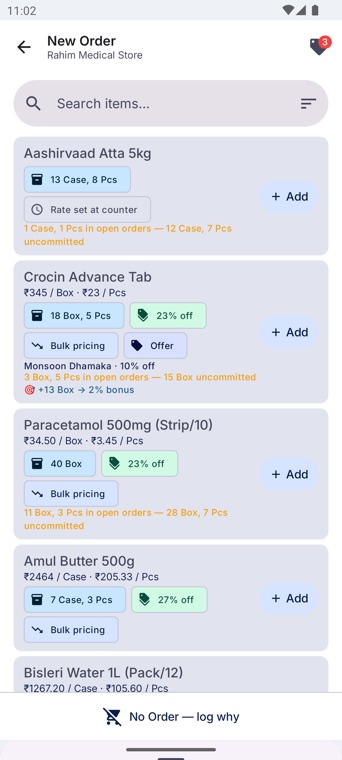
The phone updates itself overnight. The rep opens it at seven and today's prices, stock and dues are already there.
- Opens on today's beat
- Dues shown before walking in
- This shop's usual order first
- “+13 Box → 2% bonus”
- Warns when stock is already promised
- No signal? Orders still saved
Rates and schemes
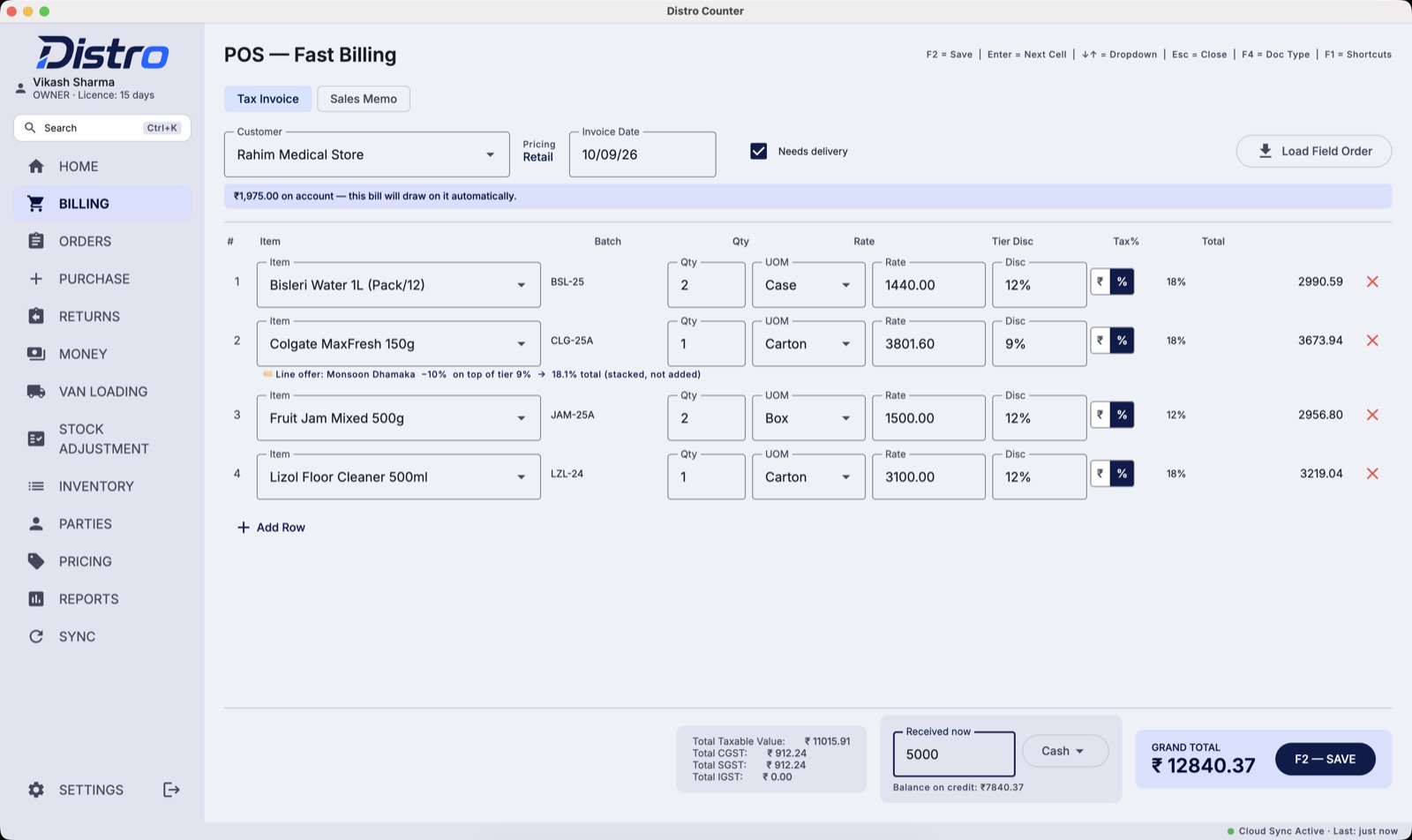
One rate, and both of you can see how it got there
The rep's phone and the counter work the rate out the same way. The bill shows the working.
Stacked, not added — 19% is the number that starts the argument.
The quote is the bill
The rep cannot promise a rate the counter will not honour.
Rebate on every bill
Earned as the target is reached. No month-end settling.
Working on the line
Offer, tier and total printed where the rate is typed.
Where it fits
It does not replace your accountant
Distro runs the counter, the van and the salesmen. Your accounts stay where they are.
Distro does
- Billing, returns and GST invoices
- Salesmen, orders and collections
- Van delivery — billed vs delivered
- Stock by batch and expiry
- GSTR-1 workbook and 3B worksheet
Your accountant keeps
- Balance sheet
- Profit and loss
- Journal entries
- Filing your GST return
Distro prepares the GST files your accountant uploads. It does not file on your behalf, and it is not tax advice.
What you are buying
Counters and salesmen — not devices
You pay for billing counters and field salesmen. You feel the difference the day something breaks.
They sign in on the new one. Nothing to re-license.
Swap in the new one yourself, from Settings.
The counter keeps billing for a month without us.
Price
One price for the counter and two salesmen
Every plan includes one billing counter and two salesman phones. Setup is free — we load your items, customers and rate charts.
1 year
₹12,000 12 months ₹1,000 a month3 years
₹36,000 3 years + 6 months free 42 months · about ₹857 a month5 years
₹60,000 5 years + 18 months free 78 months · about ₹769 a monthPaid in advance. No refunds — the licence runs to the end of the term. Renewal is at the price of the day.
Setup
Up and running in three steps
We set up every counter with you, so the first bill is right.
- Call or WhatsApp usWe book a day that suits you.
- We load your booksYour items, customers and rate charts.
- You start billingWe stay on the phone for day one.
Windows will show a blue warning when you run it. It appears because the installer is not yet signed with a paid certificate, not because anything is wrong with the file. Click More info, then Run anyway. To be certain you have the right file, check its SHA-256 against the value above.
There is no public download for the field app. When we set you up, we add your salesmen’s Google accounts and send you a link to share with them. Each salesman opens it on their phone and installs Distro from Google Play; updates then arrive on their own.
New to Distro? Arrange a setup — we install it with you.
Talk to us
We set it up with you and stay on the phone through your first day of billing. Call or message to arrange a demo.